

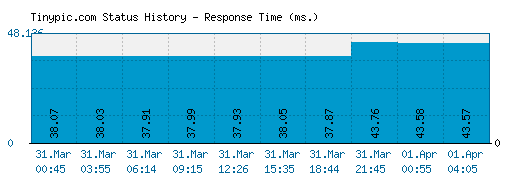
The above graph displays service status activity for Tinypic.com over the last 10 automatic checks. The blue bar displays the response time, which is better when smaller. If no bar is displayed for a specific time it means that the service was down and the site was offline.
Service Status History
| Date | Time | Ping Time | Date | Time | Ping Time | ||
| 22.Apr.2024 | 18:48 | 24.89 ms. | 22.Apr.2024 | 22:29 | 17.26 ms. | ||
| 23.Apr.2024 | 07:13 | 16.34 ms. | 24.Apr.2024 | 00:38 | 21.31 ms. | ||
| 24.Apr.2024 | 07:05 | 17.34 ms. | 24.Apr.2024 | 15:22 | 22.24 ms. | ||
| 24.Apr.2024 | 19:17 | 18.38 ms. | 25.Apr.2024 | 08:28 | 22.51 ms. | ||
| 25.Apr.2024 | 12:31 | 23.43 ms. | 26.Apr.2024 | 08:30 | 28.15 ms. |
* Times displayed are PT, Pacific Time (UTC/GMT 0) | Current server time is 11:12
We have tried pinging TinyPic website using our server and the website returned the above results. If tinypic.com is down for us too there is nothing you can do except waiting. Probably the server is overloaded, down or unreachable because of a network problem, outage or a website maintenance is in progress...
If the site is UP but you cant access the page, try one of the below solutions:
Browser Related Problems
Force a full refresh for the site. This can be achieved by pressing CTRL + F5 keys at the same time on your favourite browser (Firefox, Chrome, Explorer, etc.)
Clear the temporary cache and cookies on your browser to make sure that you have the most recent version of the web page. For instructions choose your browser :
Fix DNS Problems
A Domain Name System (DNS) allows a site IP address (192.168.x.x) to be identified with words (*.com) in order to be remembered more easily, like a phonebook for websites. This service is usually provided by your ISP.
Clear your local DNS cache to make sure that you grab the most recent cache that your ISP has. For Windows - (Start > Command Prompt > type "ipconfig /flushdns" and hit enter). For details choose your operating system :
If you can access a website at office or from a 3G network yet it's not working on your computer, it is a good idea to use an alternative DNS service other than your ISPs. OpenDNS or Google Public DNS are both excellent and free public DNS services.
Check our help page for step-by-step instructions on how to change your DNS.
Submit a comment using your Facebook ID.
Is Tinypic.com down for you right now? Submit your comments about Tinypic.com service status or report an issue below to let others know that they aren't the only ones having trouble. Please note that your country, service provider and browser information will be displayed next to your comment to better analyze a possible outage.