

Lifehacker.com website not working? Is it down right now?

lifehacker.com favicon Lifehacker.com Server Status Check
Lifehacker Screnshot
LifehackerWebsite Name:
lifehacker.comURL Checked:
response timeResponse Time:
latest downLast Down:
checking...Checking Lifehacker
Please wait while we check the server...
Lifehacker Website Status History
Lifehacker.com server report and response time

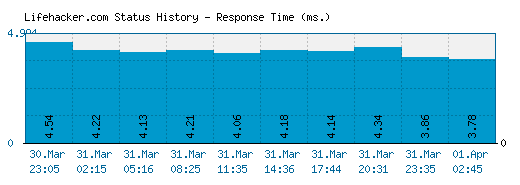
The above graph displays service status activity for Lifehacker.com over the last 10 automatic checks. The blue bar displays the response time, which is better when smaller. If no bar is displayed for a specific time it means that the service was down and the site was offline.

Service Status History :

DateTimePing Time DateTimePing Time
14.May.2013 06:3837.71 ms. 14.May.2013 12:021236.06 ms.
14.May.2013 19:4137.38 ms. 15.May.2013 09:4938.14 ms.
15.May.2013 16:4033.87 ms. 16.May.2013 07:31613.16 ms.
16.May.2013 14:2037.22 ms. 17.May.2013 04:5033.82 ms.
17.May.2013 19:3138.08 ms. 18.May.2013 04:2743.54 ms. 

* Times displayed are PST, Pacific Standard Time (GMT -08:00) - Current server time is 06:00

We have tried pinging Lifehacker website using our server and the website returned the above results. If lifehacker.com is down for us too there is nothing you can do except waiting. Probably the server is overloaded, down or unreachable because of a network problem, outage or a website maintenance is in progress...

Can't Access Lifehacker - Troubleshooting Instructions

If the site is UP but you cant access the page, try one of the below solutions:

Browser Related Problems

  • Force a full refresh for the site. This can be achieved by pressing CTRL + F5 keys at the same time on your favourite browser (Firefox, Chrome, Explorer, etc.)
  • Clear the temporary cache and cookies on your browser to make sure that you have the most recent version of the web page. For instructions choose your browser : firefox chrome internet explorer

Fix DNS Problems

A Domain Name System (DNS) allows a site IP address (192.168.x.x) to be identified with words (*.com) in order to be remembered more easily, like a phonebook for websites. This service is usually provided by your ISP.

  • Clear your local DNS cache to make sure that you grab the most recent cache that your ISP has. For Windows - (Start > Command Prompt > type "ipconfig /flushdns" and hit enter). For details choose your operating system :
  • If you can access a website at office or from a 3G network yet it's not working on your computer, it is a good idea to use an alternative DNS service other than your ISPs. OpenDNS or Google Public DNS are both excellent and free public DNS services.
  • Check our help page for step-by-step instructions on configure dnshow to change your DNS.

Ads by Google

Having Problems with Accessing Lifehacker.com?
Yoran Broodcooren · 30 October 2012 - 10:56

updates.lifehacker.com/ lifehacker is down thanks to Sandy

Chris Whipple · 30 October 2012 - 08:03

The gawker sites can be accessed through live.sitename.com

In this case, live.lifehacker.com . However it is only the newest stuff, older posts on the flooded servers are not accessible.

Chris Whipple · 30 October 2012 - 08:02

Lifehacker, along with all Gawker sites are down due to the hurricane causing their servers to be flooded.

Zach Knights · 30 October 2012 - 06:30

Seems somebody followed step by step this tutorial and tested it onto them :D LOL

Jake Coddaire · 30 October 2012 - 06:16

Keep getting a "Connection to upstream server" error. It might be because the host is updating code. Check out Australia's new site.

www.lifehacker.com.au/

Mark Goldspink · 30 October 2012 - 05:33

I blame their last 'How to do do a DoS attack on a site' article.

Bram Alexander Andersen · 30 October 2012 - 03:30

Same here - DK based

Kris Wragg · 30 October 2012 - 02:49

Looks like LifeHacker.com has lost all its life...

Submit a comment using your Facebook ID.

Is Lifehacker.com down for you right now? Submit your comments about Lifehacker.com service status or report an issue below to let others know that they aren't the only ones having trouble.

Rate Lifehacker

Lifehacker.com has been rated 4.8 out of 5 points. A total of 12 votes cast and 8 users reviewed the website.

Website Status Checker Bookmarklet

Once added to your toolbar, this button will let you to check the status of a site from your browsers toolbar.

Just drag the button your bookmarks bar:

Down Right Now?
Similar Websites
Lifehacker.comtechcrunch.com - Techcrunch
Server is up. Last checked 11 hours 28 mins ago.
Lifehacker.comgizmodo.com - Gizmodo
Server is up. Last checked 1 hour 33 mins ago.
Lifehacker.commsdn.com - MSDN Blogs
Server is up. Last checked 8 hours 45 mins ago.
Lifehacker.comengadget.com - Engadget
Server is up. Last checked 14 hours 3 mins ago.
Lifehacker.comwired.com - Wired
Server is up. Last checked 59 mins ago.
Lifehacker.compcworld.com - PCWorld
Server is up. Last checked 9 hours 44 mins ago.
Lifehacker.compcmag.com - PC Magazine
Server is up. Last checked 5 hours 13 mins ago.
Lifehacker.comzdnet.com - Zdnet
Server is up. Last checked 10 hours ago.
Down Right Now
Lifehacker.com xsellize.com - xSellize
Server is down. Last checked 3 mins ago.
Lifehacker.com own3d.tv - own3D
Server is down. Last checked 10 mins ago.
Lifehacker.com blog.com - Blog.com
Server is down. Last checked 10 mins ago.
Lifehacker.com hellocotton.com - Hellocotton
Server is down. Last checked 10 mins ago.
Lifehacker.com jointhereboot.com - Join The Reboot
Server is down. Last checked 10 mins ago.
Latest Sites Checked
Lifehacker.comjetstar.com - Jetstar
Server is up. Last checked 1 sec ago.
Lifehacker.compaypal.co.uk - Paypal UK
Server is up. Last checked 4 secs ago.
Lifehacker.cominstagr.am - Instagram
Server is up. Last checked 4 secs ago.
Lifehacker.comconnected2.me - Connected2 Me
Server is up. Last checked 7 secs ago.
Lifehacker.commarksandspencer.com - Marks & Spencer
Server is up. Last checked 8 secs ago.